



Add purchases and contest payments.
Try it first
Choose services, then test one complete purchase#
You need Managed IAP is optional. Keep an existing IAP backend/provider, or use Node 22 and studio test keys for the Playmos path below.
- Keep your existing IAP integration, or choose Playmos Managed IAP and reuse your game’s SKUs.
- Save one product or contest attempt and connect trusted verification and delivery.
- Test delivery or admission, then interrupt and recover the same payment.
Check your result One studio-owned purchase produces one durable grant, even after a retry.
Give players one clear total, one payment action and a verified return to the game. Use Playmos payments or your own provider; keep the same checkout and recovery pattern.
New to IAP? Start with Add IAP to your game →
One checkout. Your choice of backend.#
Start with Playmos Managed IAP when you want Playmos to keep trusted products and prices and verify payments. Your trusted game service delivers the item. For contests, that service verifies admission to the exact paid attempt before accepting a score.
| Setup | Payments and verification | Items and contest admission |
|---|---|---|
| Hub services | Playmos payment service; checkout stays in the trusted Hub host. | A game-specific trusted service. Wire and verify the host bridge and delivery/admission adapter before accepting payments. |
| Self-hosted | Your provider and server; keep your existing catalogue. No Playmos payment credentials are required. | Your server. The checkout controller can call your provider for either an item or a contest entry. |
| Mixed | Playmos payments with your own backend, or your provider with a Hub-hosted game. | One authoritative backend and grant ledger for each order. The game’s hosting location does not choose its payment provider. |
Hub integration prerequisite: the standard uploaded-game practice path does not automatically install a paid checkout bridge or inventory service. These integrations require explicit host/backend wiring; shared previews remain free practice. The walkthrough below demonstrates the checkout component, not a deployed Hub inventory service.
Having your own server does not mean you need your own payment system. The common mixed setup is Playmos payments plus your existing game server. Keep the same SKU for gameplay and payment records; read the price from the payment server instead of maintaining it twice.
Follow the same five steps
- Choose your services. Decide who owns the trusted catalogue, who verifies the payment, and which backend delivers the item or admits the contest attempt. Keep server secrets in that backend’s vault/environment. Privy supplies a wallet; it does not deliver inventory.
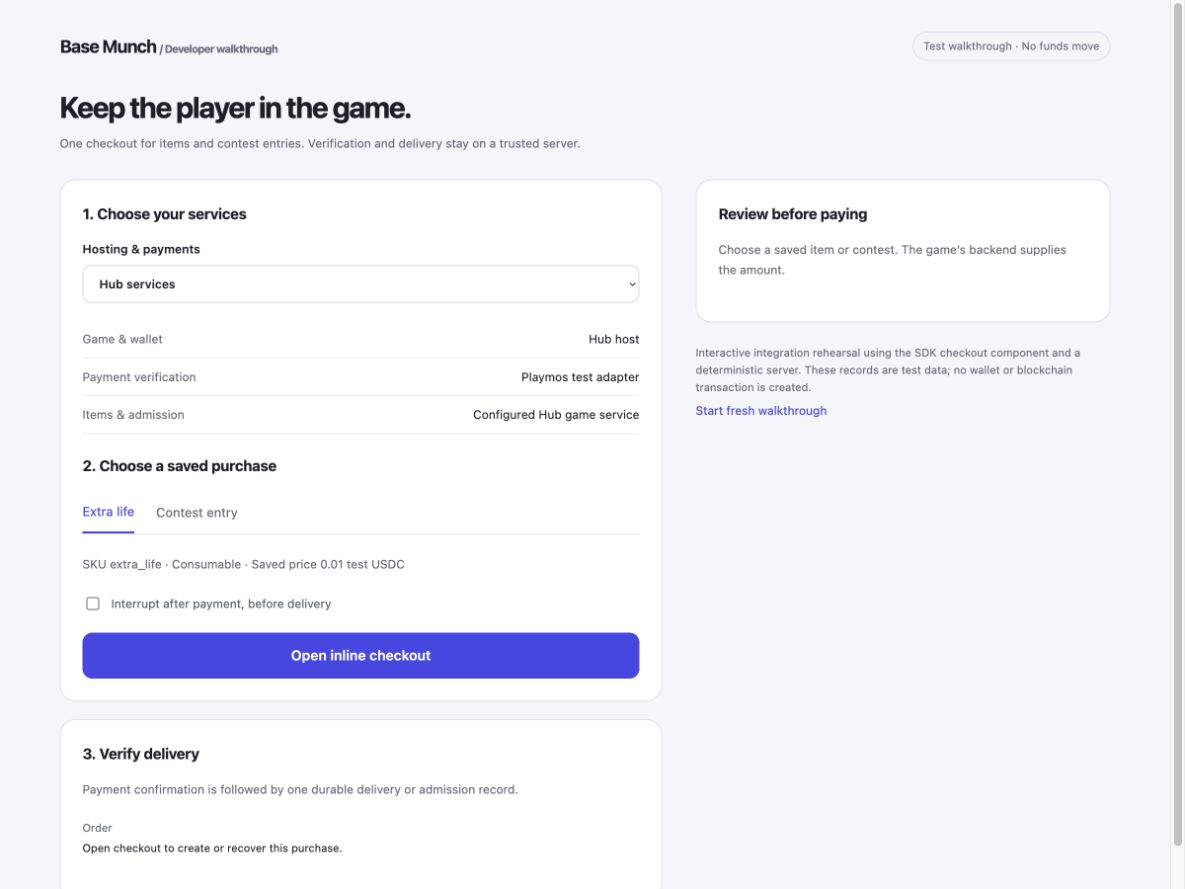
- Save the product or contest. For Managed IAP, use Products to import CSV / Excel, review changes and save. For your own provider, retain its catalogue. For a contest, save the pool, series or round, entry fee, player and attempt identity on your server. The purchase button sends an item or attempt ID, never an editable price.
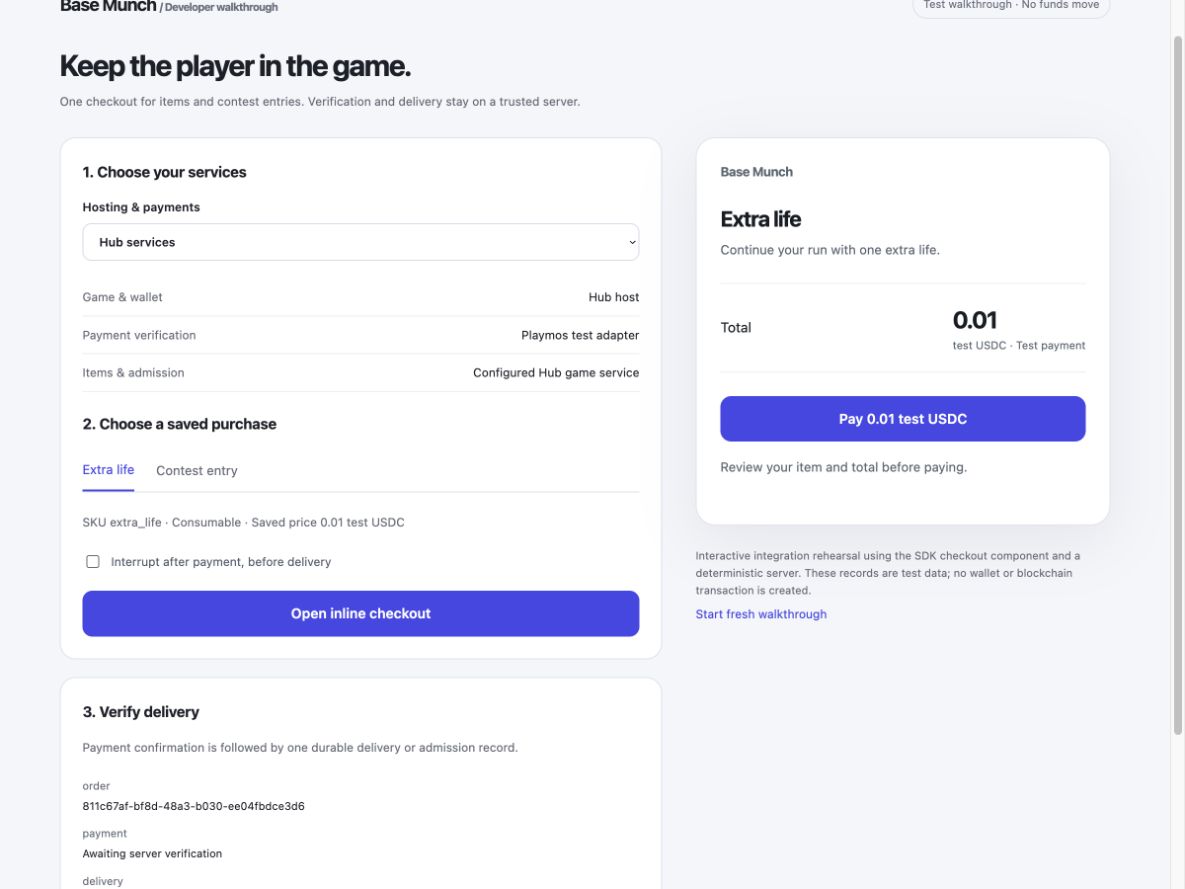
- Connect delivery. For Playmos plus your server, use the backend, HTTP and worker helpers. Register the HTTPS callback and verify its original signed body. For your provider, use the custom-provider adapter. The backend freezes the quote, authenticates the player, binds the payment before signing and atomically records delivery. Manual completion and callbacks share the same ledger.
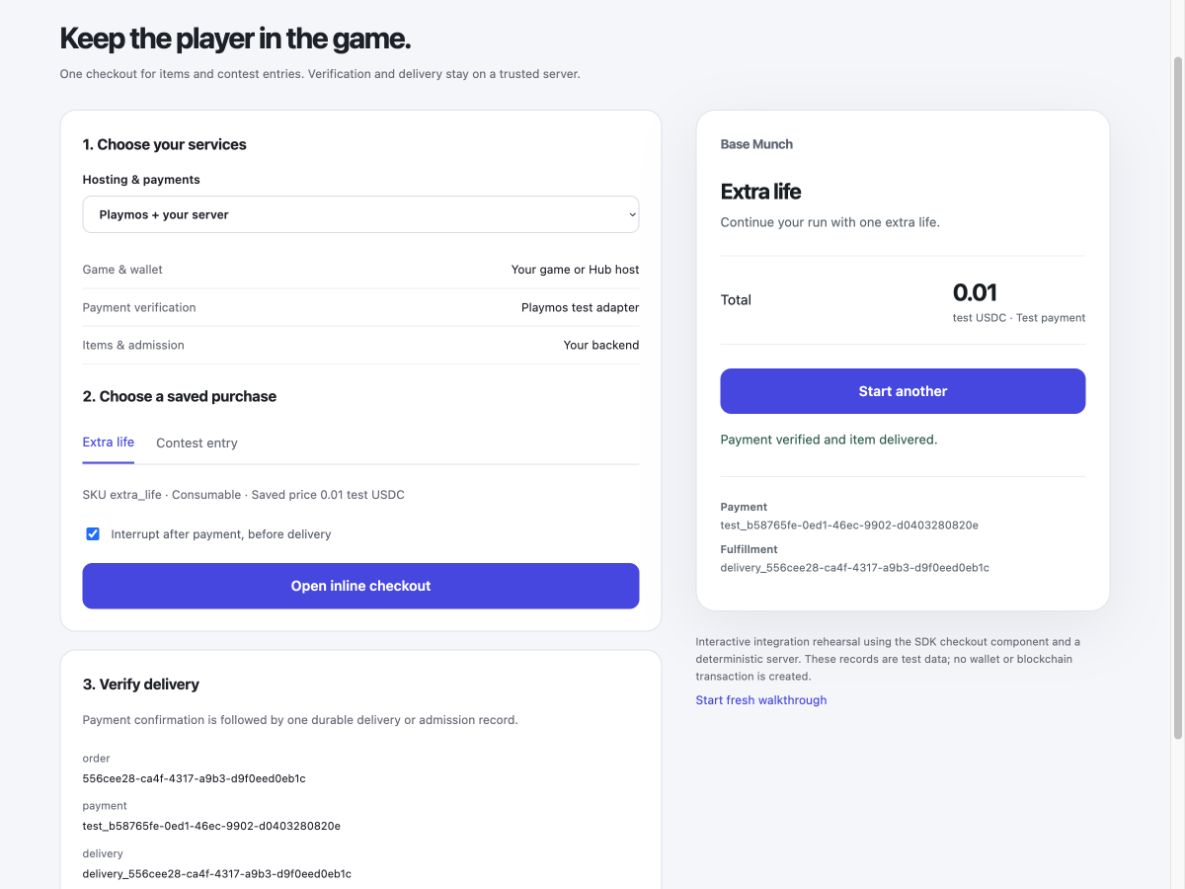
- Test one complete checkout. Review the total and select Pay once. Keep the saved order through wallet signing and payment verification. An item ends with a delivery reference; a contest entry ends with server-verified admission to that exact attempt. Never unlock gameplay from the browser’s payment-success callback.
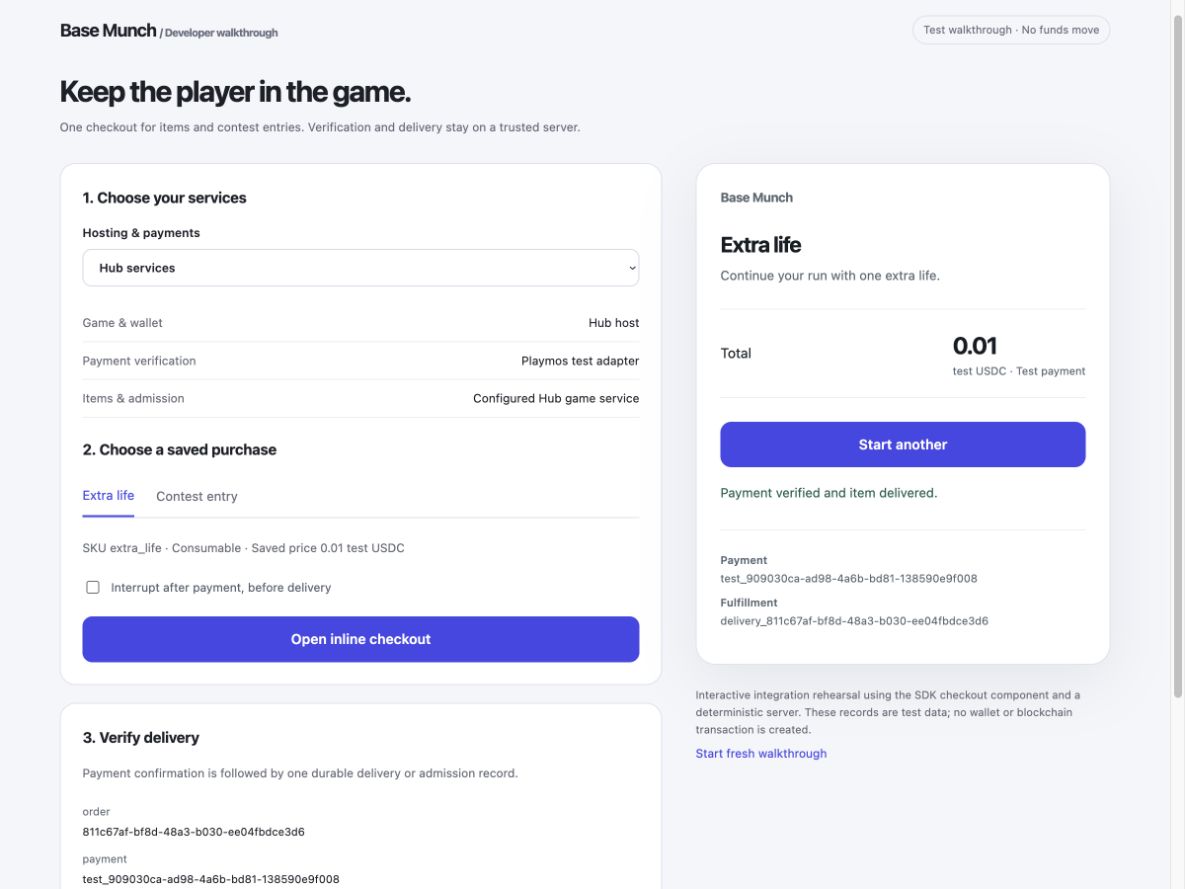
- Interrupt it and recover. Reload while payment is pending, check the same saved order and replay the callback. You must get one payment and one delivery. Test a cancelled wallet, insufficient funds, an expired quote, a different player, a wrong amount, callback delay and server outage. Keep uncertain payments pending; do not ask the player to pay again.
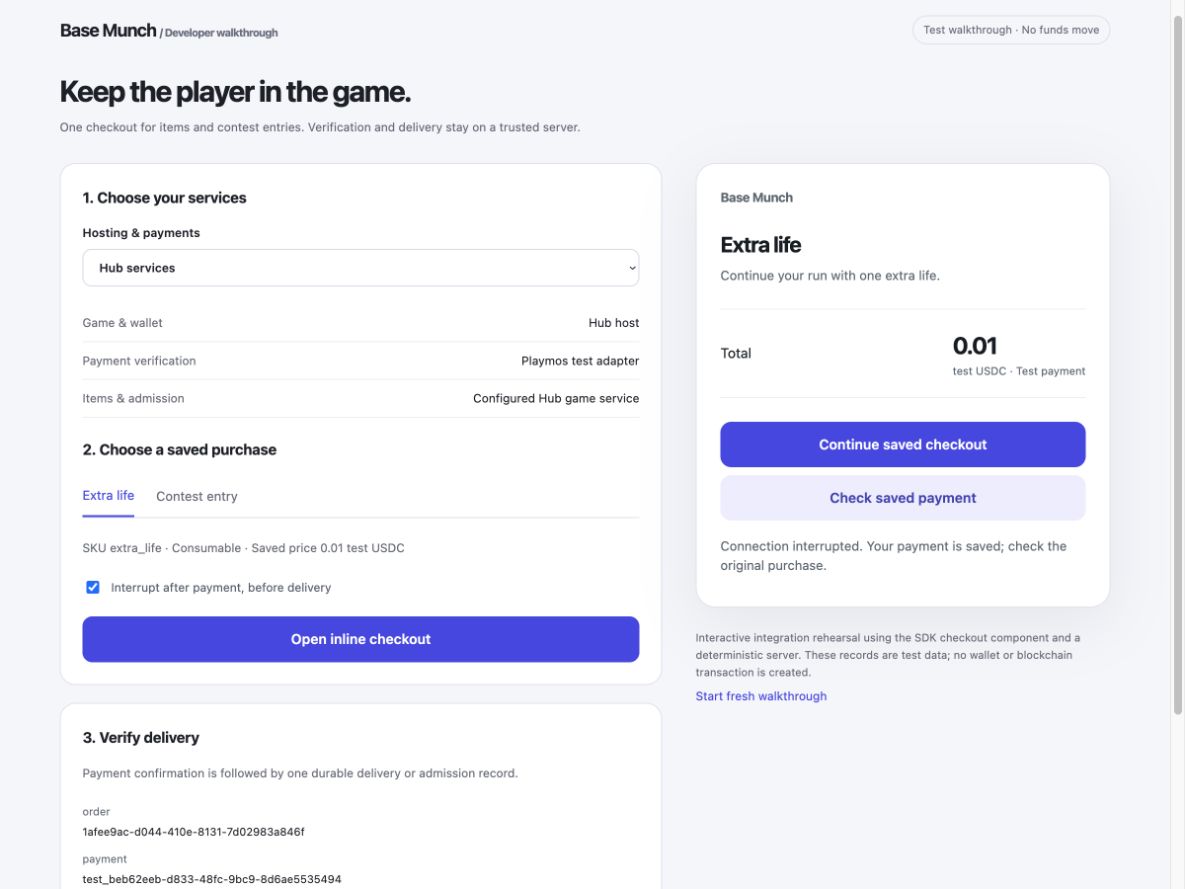
Contest payments use the same checkout#
Use the Playmos contest adapter for a registered Playmos round, or the custom adapter with kind: 'contest-entry' for your own server/provider. Your backend freezes and verifies the original round or epoch, pool, identity, payer, currency and fee. Keep legacy rounds and epoch series separate. It must reject an attempt for another round even if the payment is genuine.
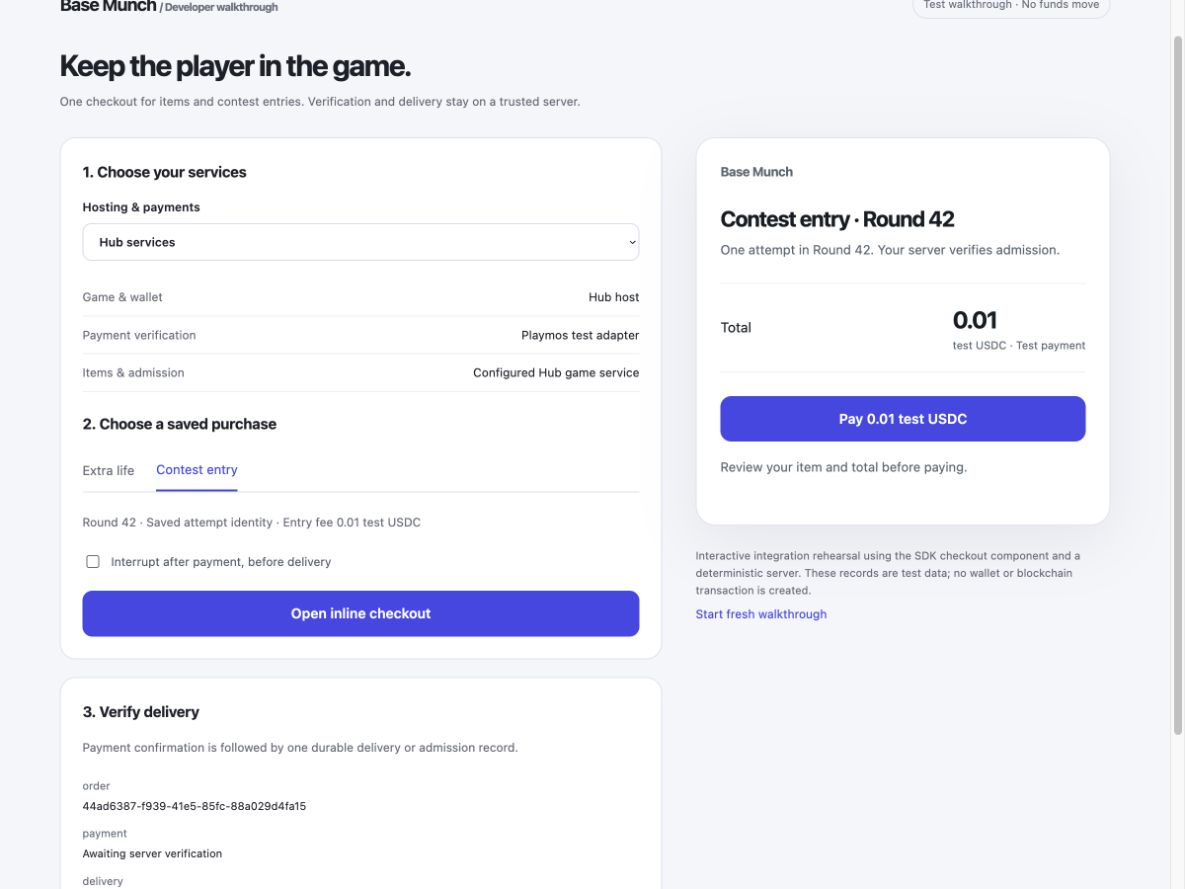
Admission is the first checkpoint. Also test trusted scoring, round close, settlement and the winner’s actual payout or withdrawal. A payment receipt or leaderboard row does not prove a prize was transferred. Contest setup and settlement →
Watch the variations#
These short, silent walkthroughs use the actual checkout component with a deterministic test backend. They demonstrate integration and recovery without moving funds. The separate Base Sepolia receipts show real testnet payment evidence.
Prepare once for Apple and Google#
Keep one internal SKU and map it to the App Store product ID and Google Play product ID. The catalogue editor already stores these optional mappings. Select the provider for the distribution channel; a native store price and currency come from that store. Do not convert a store receipt into a USDC transaction or assume web checkout is permitted in every store or region.
| Keep stable | Add in the native adapter |
|---|---|
| Game, signed-in player, internal SKU, product type, order and delivery ledger | Apple StoreKit purchase or Google Play Billing purchase; provider-specific product ID, environment and transaction identity |
| Server verification before delivery; atomic replay protection; pending and recovery UI | Verify Apple-signed transactions or Google purchase tokens on the trusted backend; bind them to the authenticated account |
| Restore permanent ownership and reconcile refunds without a second grant | Store notifications, cancellation/revocation handling and store-required finishing, acknowledgement or consumption after delivery |
Native store checkout adapters are not available yet. Product mappings and the provider boundary prepare the integration; Apple/Google sandbox purchase, recovery, restore and notification tests remain required before claiming support. Contest eligibility and payment rules require separate store review; a reusable adapter does not make paid contests automatically eligible.
Follow Apple’s transaction verification and finishing guidance, App Store Server Notifications and Google Play Billing verification and acknowledgement guidance when implementing those adapters.
Choose your checkout experience#
Use Playmos Managed IAP with your fulfillment server, or keep your existing checkout and provider. The SDK offers a compact checkout interface or hooks for your own game UI. It prepares a saved server quote before payment, retains interrupted purchases and waits for trusted fulfillment. It does not require a second Playmos catalogue when your provider manages IAP.
Install @playmos/sdk@0.3.38 and import @playmos/sdk/checkout. Choose the example that matches your backend, replace the game and product details, and connect your existing session.
- Playmos payments + your fulfillment server: use the provided checkout with your wallet and the authenticated routes above.
- Your checkout + your payment provider: keep your existing catalogue and server; no Playmos payment credentials are needed.
- Contest entry: save the exact round and player identity, then wait for your server to verify admission.
Use mountCheckout for the provided interface, or prepare, pay, check and startNew with your own UI. Integration guide and backend contract →
For the Playmos path, save the first module as playmos-iap.mjs, add <div id="checkout"></div> to your page, and call it after sign-in and wallet connection:
import {showPlaymosPurchase} from './playmos-iap.mjs';const view = await showPlaymosPurchase({root: document.querySelector('#checkout'),provider: walletProvider, // Your connected Privy or EIP-1193 provider.publishableKey: 'YOUR_STUDIO_PUBLISHABLE_KEY',gameId: 'YOUR_GAME_ID',playerId: session.playerId,sku: 'extra_life',title: 'Extra life',});// Call view.dispose() when leaving this screen.
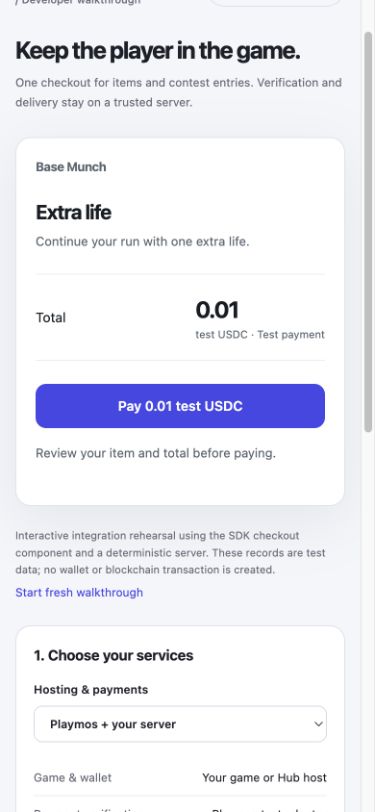
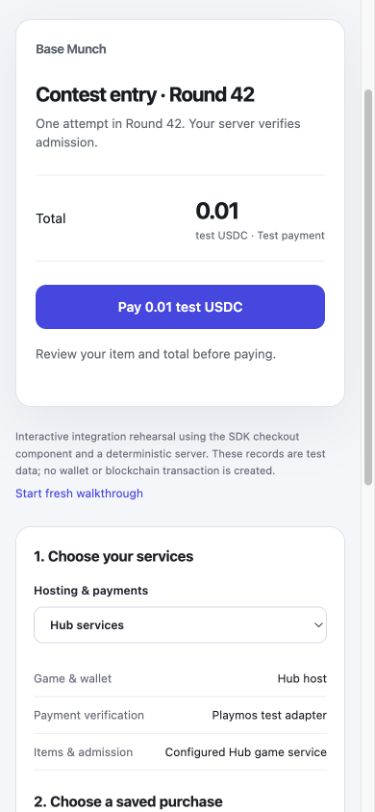
Inside the Hub, the trusted parent keeps the wallet; an embedded game requests an allowed product or contest. Standalone games supply their own wallet or provider. Your backend owns session identity, payment verification and fulfillment in either case. Keep wallet access in the host and verify fulfillment on your server before returning the player to the game.
From the game to payment and back#
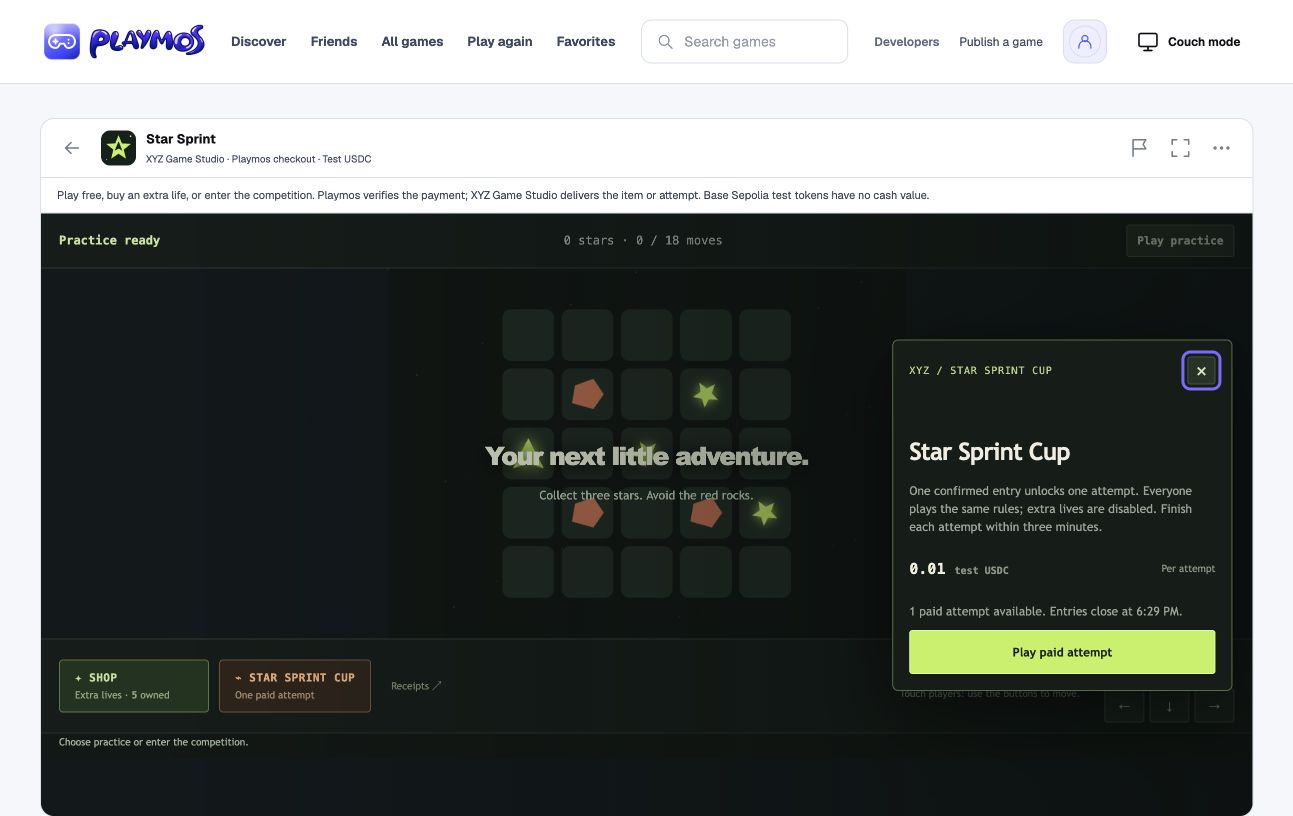
- Open Shop or Contest inside the game. The game requests a registered item or competition; the Hub owns wallet connection and checkout.
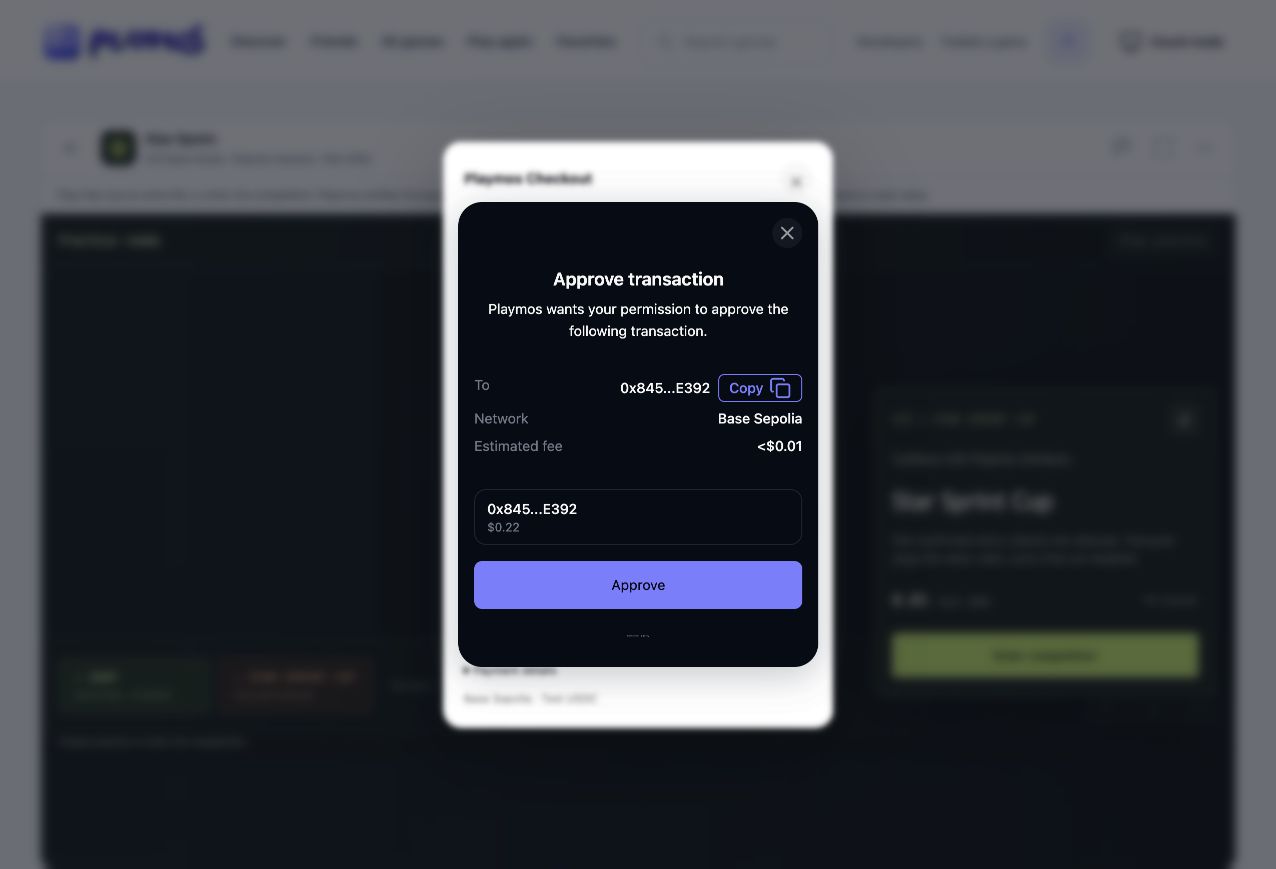
- Review the saved product, price and test network. If needed, connect your wallet as part of checkout. The game stays in place.
- Approve in your wallet. A compatible batching wallet executes token permission and payment together. The first payment can include account authorization; a separate setup screen is not required. Wallet software may still show more than one approval.
- Wait for your trusted backend to verify the receipt and grant the item or admit the attempt once. Return to the game with the result.
Canceling before submission grants nothing. If a payment might have been submitted, keep its original order and check status. Only a definite rejection before broadcast can offer payment retry for that same intent. Your game must never treat closing a wallet window, a callback or a browser success message as admission.
Paid replay without carrying entries forever#
For replayable contests, your server blocks another entry purchase while a run is active or an unused paid attempt is available. After finishing, the player may buy another attempt until the competition closes. Bind admission to the exact competition and its server-owned closing time. Unused entries expire at closing and cannot unlock a different competition; keep their receipts in history. Recheck the deadline before wallet signing, even for an old quote. Restore active runs after reload and release expired sessions. An already started run follows the published bounded completion and scoring policy.
The Star Sprint example uses these rules with configurable competition duration and bounded attempts. These admission checks do not settle a prize pool or prove winner payouts. Define how late-confirmed payments are admitted or refunded in your contest terms.
Testnet payment evidence#
On October 26, 2026, a fresh public SDK sandbox purchase of 0.01 test USDC returned confirmed and verifiedVia: 'chain'. A separate Base Sepolia RPC read confirmed the successful transaction and USDC transfers. Inspect the IAP transaction →
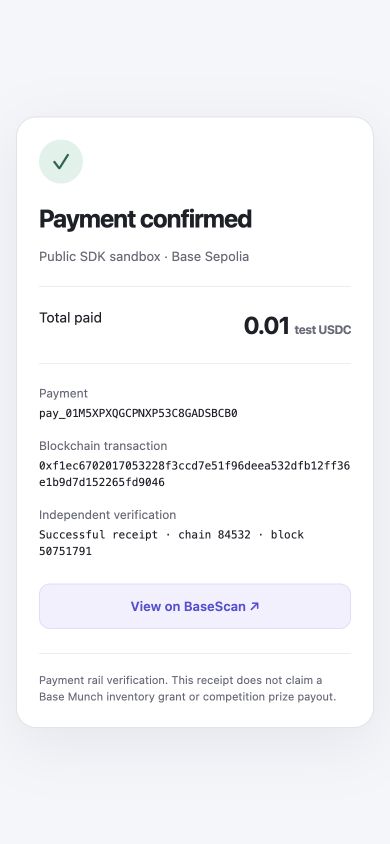
pay_01M5XPXQGCPNXP53C8GADSBCB0. Payment-rail evidence, not a Base Munch inventory grant.A separate 0.01 test USDC entry through the public Base Munch SDK sandbox also returned confirmed; an independent contract read returned hasEntered: true for the exact saved round key and identity. Inspect the entry transaction →
On October 27, 2026, Star Sprint in the local Hub completed a real Privy-funded entry using the same saved payment after recovery: one Base Sepolia type-4 transaction contained USDC approval and contest entry. An independent chain read and the game backend verified admission. Inspect the atomic Star Sprint entry →. This proves the local Hub bridge and testnet admission, separately from hosted-account rollout and prize distribution.
These public sandbox receipts prove the payment rail and entry admission. Your own studio’s catalogue, hosted game fulfillment, authoritative scoring, contest settlement and actual winner payout or withdrawal must pass separately before release.
Product registration and manual backend setup
Choose who manages your purchases#
Managed IAP is optional. Use Playmos when you want us to register purchasable products, process payments and verify their blockchain receipts. If your own backend or another provider already manages IAP, keep that integration; you do not need a second catalogue in Playmos.
| Your path | What to do |
|---|---|
| Playmos Managed IAP | Register the products you sell through Playmos. Use our checkout and receipt verification; connect fulfillment to your backend or a supported managed game service. |
| Your existing IAP backend / provider | Keep your product catalogue, checkout, server verification and fulfillment there. Skip this workspace and its catalogue. Playmos does not automatically verify or import purchases made outside its IAP integration. |
Having a server does not force either choice. You can host your own game backend and still use Playmos for payments. If you choose Playmos checkout, its products must be registered with Playmos.
Why register an item in Playmos?#
The payment server needs a trusted record of the SKU, price, currency and availability so it can reject altered purchase requests. A browser’s price label is not payment authority. Your game separately needs to know what extra_life does: its icon, description and the gameplay effect to grant.
Keep the same SKU in both places, not two hand-maintained price lists. Import your existing catalogue or publish it from your build tools through the API. Read Playmos’s catalogue for shop prices and availability. Keep gameplay effects in your game. Freeze the quoted terms with each server-side order so a later price edit does not change a purchase already in progress.
For example, Playmos records that extra_life costs 0.01 test USDC. Your game maps that same SKU to one extra life. After payment verification, trusted fulfillment code adds the life once. The game can display the server’s price rather than storing another editable copy.
What Playmos manages — and what your game manages#
Playmos handles its payment records and chain verification, so your game does not need to build a blockchain receipt indexer for this path. Your trusted fulfillment code still authenticates the player, matches the order and grants the right item once. A confirmed payment is not an inventory grant.
No backend yet? Choose a supported managed game service and verify its fulfillment capability for your build, or deploy the backend helper below. Saving a catalogue or uploading a browser ZIP does not deploy a custom server or automatically grant inventory. Privy supplies a wallet; it does not replace the product catalogue, payment verification or fulfillment.
Manual setup · your own tools and server#
No agent or MCP is required. This is the same Playmos Managed IAP service used by the dashboard; you can configure and integrate it entirely from your own project. Self-hosting your game backend does not self-host the Playmos payment service.
- Prepare studio test credentials. Follow manual studio setup, configure the payout wallet and keep its secret in your server’s environment. Only the publishable key belongs in the game.
- Register products. Install
@playmos/sdk@0.3.38. Save the example assetup-iap.mjs, edit the game name / external ID and item to match your game, then runnode setup-iap.mjs. Retain the returned game ID. The sandbox alias uses your studio’s configured test rail.
import { Playmos } from '@playmos/sdk';// Run on your server or workstation, never in a browser or uploaded ZIP.// Set PLAYMOS_SECRET_KEY securely in the process environment; do not log it.if (!process.env.PLAYMOS_SECRET_KEY?.startsWith('sk_test_'))throw new Error('Set your studio test secret key.');const client = new Playmos({ apiKey: process.env.PLAYMOS_SECRET_KEY,apiBaseUrl: 'https://api.test.playmos.io/v1', network: 'base-sepolia' });// Reuse your existing external ID. Keep it stable when rerunning this script.const game = await client.commerce.registerGame({ externalId: 'my-game',name: 'My game', sourceGameId: 'game_sandbox_iap' });const catalog = await client.commerce.catalog(game.id);// Reuse the SKU from your game. Keep other products; update only this one.const item = { sku: 'extra_life', name: 'Extra life', description: 'One extra life',amount: '0.01', type: 'consumable', active: true };const existing = catalog.products.find(product => product.sku === item.sku);if (existing && existing.type !== item.type)throw new Error('Saved product types cannot change. Use a new SKU.');const products = catalog.products.filter(product => product.sku !== item.sku);products.push({ ...existing, ...item });const saved = await client.commerce.saveCatalog({ ...catalog, products });console.log({ gameId: saved.gameId, revision: saved.version, sku: item.sku });// A stale revision (409) requires a fresh read and review, not a blind overwrite.
For a larger catalogue, load your existing server-side product export into the same products array; keep one source of truth. Read catalog(gameId) before saveCatalog(...) and preserve products you are not changing. Archive with active: false; saved SKUs and types remain fixed for receipt history. On 409, reread and review the changes before retrying.
- Host your order and fulfillment routes. Download the Node backend helper. Replace
YOUR_GAME_ID, setPLAYMOS_SECRET_KEYsecurely (the studio setup guide calls the same server secretPLAYMOS_SECRET) and persistPLAYMOS_ORDER_DB. Use the Node HTTP adapter for the order, completion and callback routes. SetAPP_ORIGINto your game’s exact origin andSESSION_MODULEto an absolute module path exportingplayerFromRequest(request); resolve your existing signed session to its player ID, or returnnull. Startnode playmos-store-http.mjsbehind your HTTPS reverse proxy. The adapter binds to loopback, rejects cross-origin player requests and never trusts a player ID in the body. Adapt the helper’s inventory transaction to your database. - Connect your game. Download the browser helper, replace the game ID, SKU and publishable key, and bind it to your buy button and wallet provider. Prices come from the saved server quote. For Privy, use the optional React wrapper inside your configured Privy provider.
- Recover missed completions. Register your external HTTPS endpoint using the manual webhook instructions. Pass the raw body and signature to
receivePlaymosWebhook, keep its signing secret on the server, and run the recovery worker withnode playmos-store-worker.mjs. Use the same persistent database and environment as the server. Registerhttps://your-server.example/api/store/webhook; the adapter passes the unmodified body to the signature verifier. Webhooks and manual completion share the same grant ledger. - Test the whole purchase. On Base Sepolia, buy one saved SKU and check that the server verifies it and grants once. Reload after interrupting checkout; recover the same order. Replay completion and a webhook; the inventory must not increase twice. A wrong player, SKU or amount must never grant. See receipt verification and recovery.
Using your existing IAP server instead#
Skip Playmos catalogue registration, createPlaymosIapProvider and these Playmos-specific helpers. Keep the purchase button connected to your current backend/provider. That backend owns the trusted products and prices, authenticates orders, verifies receipts with its provider or chain, and records one atomic inventory grant per payment. Do not send another provider’s receipt to Playmos’s verifier.
For a direct blockchain integration, your server must verify the intended chain, contract, recipient, asset, amount, successful receipt and confirmation policy, then bind that payment to the stored player/order and prevent reuse. A client-supplied transaction hash or wallet signature alone is not proof of payment. Test cancellation, pending receipts, RPC outages, reloads and duplicate callbacks before release.
This describes bringing your own IAP backend. It does not provision a self-hosted Playmos payment service or automatically connect an external checkout to Hub purchase history. Game review and release requirements still apply.
If it did not work#
Pending means check the saved payment again. Do not create a replacement charge to resolve uncertainty.
Try one variation Repeat completion for the saved payment. Explain why inventory must stay unchanged.
Continue with the next guide →