



Verify payments.
Try it first
Prove a purchase before granting an item#
You need A saved studio-owned payment ID and your backend verifier.
- Read its status and verification provenance.
- Match the stored player, game, SKU, amount and network.
- Submit completion twice against one atomic fulfillment record.
Check your result One matching confirmed chain receipt creates exactly one grant.
Using Playmos Managed IAP? Register products in Playmos; we verify the payment, and your trusted fulfillment code grants the item. Already managing IAP with your own backend or provider? Keep it and skip our catalogue. Choose your IAP path or follow the manual integration.
The chain determines settlement. Your backend determines whether the payment fulfills the intended purchase.
Payment lifecycle#
| Status | What it means |
|---|---|
| created | An intent exists. No settlement is proven. |
| pending | Settlement is in progress. Wait and verify the same ID. |
| confirmed | The service reports a confirmed payment. Inspect verification provenance. |
| failed | The attempt failed. Diagnose before creating a new purchase. |
Verification provenance#
verifiedVia: 'chain' means the status was derived from chain verification. 'cache' is cached/offline information; 'degraded' means fresh chain verification is unavailable. Do not treat a degraded cached result as a fresh financial receipt.
IAP verification matches the payment’s on-chain event. Round admission checks the exact pool, round key and entrant identity. A transaction hash alone is not proof that the expected payment succeeded.
Grant once on your backend#
Keep sk_ keys server-side. Verify the ID under your studio, match player/SKU/amount and atomically deduplicate fulfillment. Webhooks use the same fulfillment record so a webhook and a manual verification cannot grant twice.
Recover from an interrupted request#
Persist the purchase key before sending. Retry the same purchase with the same key. After you know the payment ID, retry verify(id). A timeout or wallet cancellation is not a confirmed purchase.
Payment inputs#
| Field | Contract |
|---|---|
| amount | Decimal string, positive and at most two decimal places. Public sandbox cap: 1.00 per request. |
| sku / playerId | Required product and opaque player IDs. Match both during fulfillment. |
| gameId | Use game_sandbox_iap with the public sandbox key; your own key resolves studio-owned resources. |
| studio | Optional recipient wallet; otherwise the service uses the key’s configured studio wallet. |
| idempotencyKey | Persist once per purchase; reuse on retry. Omitting it creates a new SDK-generated key per call. |
| metadata | Up to 20 string key/value pairs. No secrets or authorization claims. |
Payment and verification fields#
Payment includes ID, kind, status, amount/fee/net, chain and creation time. txHash is optional until there is a transaction. Both Payment and VerifyResult type optional entry fields split, roundKey and splitBps. Their presence depends on the payment path; check them before use. Verification may include identity, chainAmount and integer chainAmountMicro; splitBps describes the returned split; it is not authority for a different studio’s release.
IAP charges 1% to Playmos. Read the receipt’s exact decimal fee/net; do not derive a ledger from rounded UI cents. Own-pool contests use their immutable series split. The legacy/shared-sandbox entry split is not your studio’s published take.
Rehearse purchase outcomes#
Open Developer Console → IAP testing. Enter a product ID and price, choose a confirmed, pending, cancelled or failed outcome, then select Simulate purchase. A confirmed rehearsal proposes one grant; other outcomes propose zero. Select Replay confirmation to inspect duplicate handling.
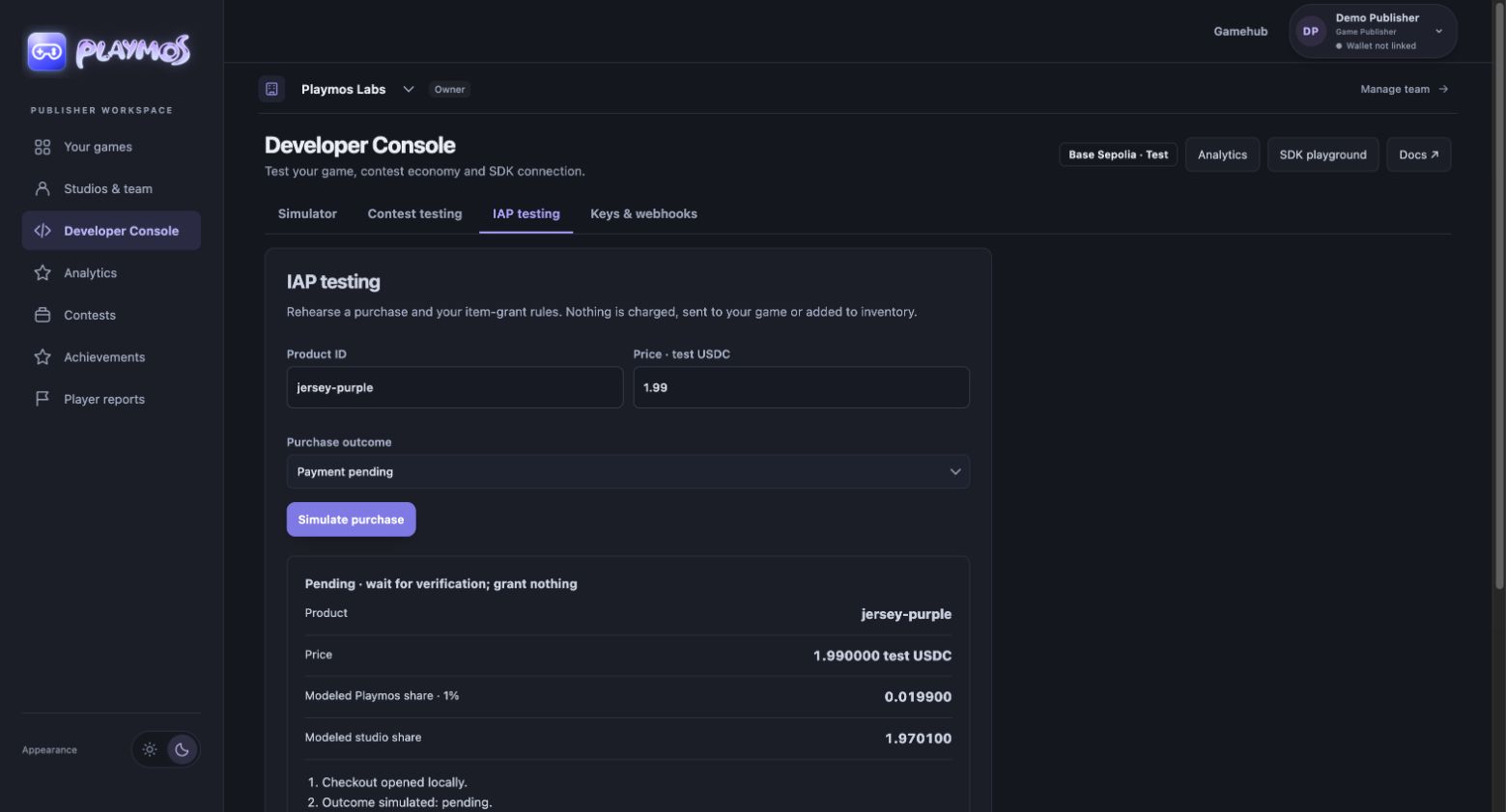
This tool rehearses rules; it does not verify your game’s fulfillment. Continue with payment verification and webhooks, then persist one grant per verified payment ID on your backend.
Reconcile a saved payment in the console#
Payments & settlement reads studio-owned SDK records with the encrypted server connection. Search by payment ID alone, or filter by SDK game, player, status and the original idempotency key. The list is limited to 100 matches; narrow filters when more exist. An exact receipt check reads the same payment and never requests another charge. Keep original terms and wallet batch IDs when recovering a pending purchase.
A confirmed contest entry is admission, not a completed prize payout. Use Contest testing to inspect the registered pool’s series and epoch, then reconcile prize credit and the wallet withdrawal separately. A console receipt does not authorize item fulfillment, settlement or withdrawal. Bank payout onboarding remains a stub.
If it did not work#
Cached or degraded confirmation is not a fresh receipt. Keep the order pending and retry its verification.
Try one variation Present the same receipt for a different player in an isolated test. Your backend must reject it.
Continue with the next guide →