



Put payments in your game.
Try it first
Add one buy button to your game#
You need A saved active SKU, publishable test configuration and authenticated backend routes.
- For Playmos Managed IAP, use Add to your game or the manual download in the quick start.
- Bind the saved order and prepared payment before opening the wallet.
- Interrupt the request, reload and resume that same purchase.
Check your result The UI recovers its original order and your backend grants the item once.
For Playmos Managed IAP, use the same SDK in a browser, HTML5 game or host page. Keep purchase state stable while the service or wallet completes the request. If your existing IAP backend already handles purchases, keep its checkout instead; no Playmos catalogue is required.
Install and load#
npm install @playmos/sdk@0.3.38
Import Playmos from @playmos/sdk in your Vite, Phaser or other bundled app. The SDK uses viem; load it separately from the game where that improves first load on mobile. Never import @playmos/sdk/server in this bundle.
Wire the buy button#
Add the page elements and wire them to the helper:
<button id="buy">Buy an extra life · 0.01 test USDC</button><pre id="payment-status" aria-live="polite"></pre>
Save the helper as purchase.ts and import it into the page module. The example binds an existing button and output element. The purchase key is saved before the request, the button is disabled during submission, and a payment ID is retained even if server settlement times out.
import { bindSandboxPurchase } from './purchase';const button = document.querySelector<HTMLButtonElement>('#buy')!;const output = document.querySelector<HTMLElement>('#payment-status')!;bindSandboxPurchase(button, output);
Make pending and recovery visible#
Show a pending state while the request runs. A timeout may contain error.detail.paymentId; keep it and call verify(id). Retry the same purchase with the original key if no ID was returned. Start a new key only for an intentional new purchase.
Choose the player experience#
The public sandbox’s settle: 'server' path uses test funds and does not ask the player to connect a wallet. For a wallet-funded payment, provide the host’s EIP-1193 provider and follow wallet and gas configuration. Server settlement is not a production wallet substitute.
Keep the grant on your backend#
The output is a display of the receipt. Send its ID to your backend, match your stored purchase and verify it under your studio before granting once. An iframe message, local receipt or disabled button is not an authorization boundary.
Use the playground to inspect actual SDK responses before wiring your game. The current portal iframe stage does not provide this payment bridge automatically.
Your data or Hub intelligence#
Read Analytics & your telemetry for consent, complete event fields, custom events, exporters and the Playmos Analytics upgrade. Collect your own game telemetry with standard OpenTelemetry loggers, meters, exporters and Collectors. Choose your own backend and dashboards, or subscribe to Playmos for Hub-correlated publisher intelligence: conversion funnels, repeat players, shared audiences, player profiles and network activity. You pay for correlation and insight, not transport.
In the SDK, configure new Playmos({ apiKey, analytics: { enabled, logger, meter, context } }) with your standard OTel logger and a studio-scoped player/session context. Call gameViewed(), sessionStarted() and sessionEnded() at the game’s real lifecycle boundaries; wallet and commerce methods capture their own observed outcomes. Use your standard exporter, not a custom Playmos transport. Hub OTLP/HTTP JSON logs use /api/analytics/v1/logs; source keys stay on your backend or Collector. Testnet amounts and reported purchases are not verified mainnet revenue.
Open Analytics, select a game, UTC period and network, then inspect the ordered funnel. Use the player table for session activity and audience overlap for repeat and cross-game players. Select one network to inspect reported amounts.
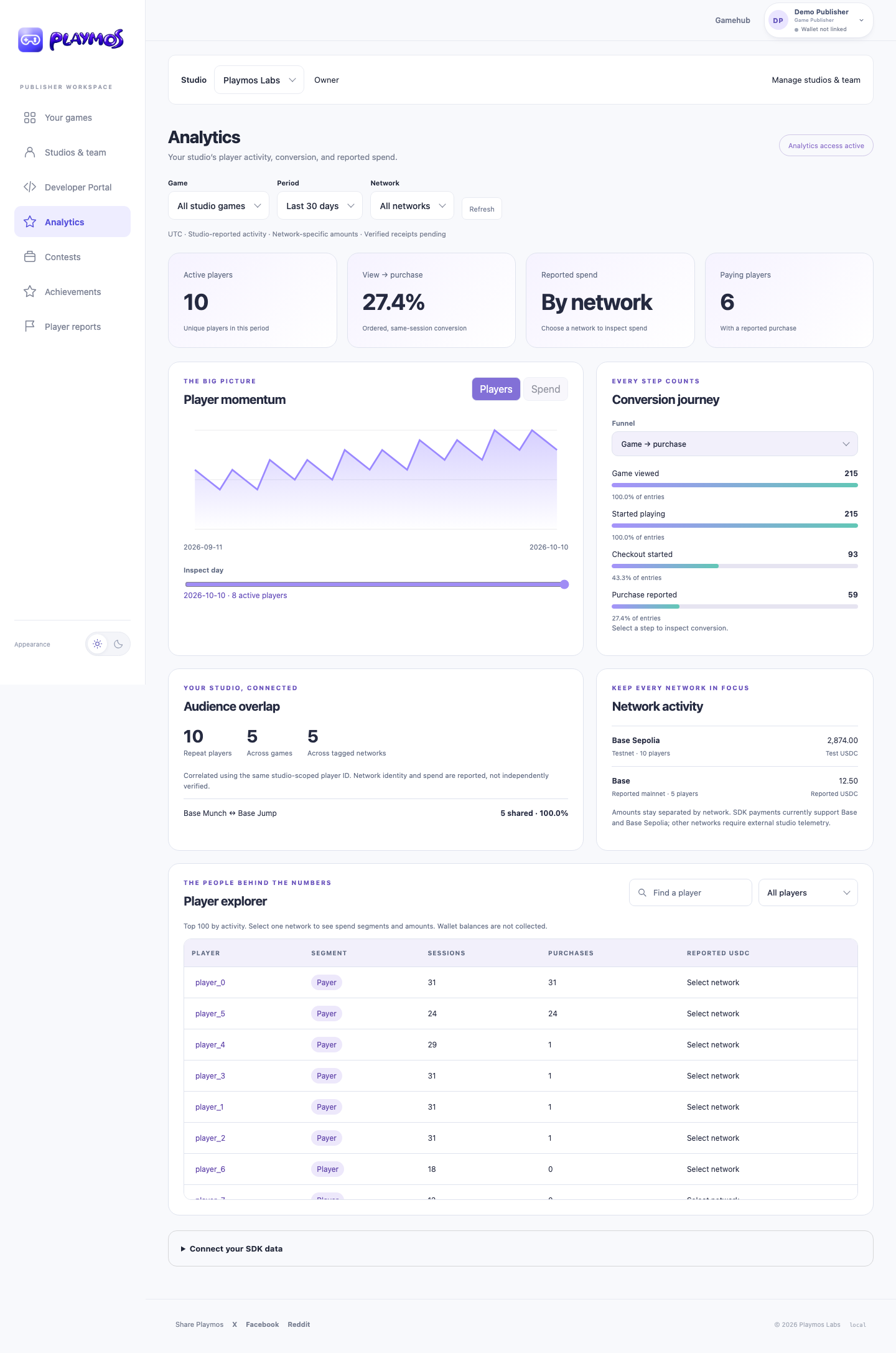
The hosted-game bridge collects only after player opt-in. Independent studios export through their trusted backend or Collector; source keys never belong in browser bundles. Delivery counters track accepted and duplicate events. Error rates, latency percentiles and verified payout reconciliation remain additional integration work.
If it did not work#
If the account or wallet changed, recover with the original identity; do not silently switch the payer.
Try one variation Reload while the saved purchase is pending. The next action should resume it, without another wallet send.
Continue with the next guide →