


Mo: your player, across games
Try it first
Render the signed-in player’s appearance#
You need A compatible Hub-embedded build and the current Mo adapter.
- Read the viewer profile through the trusted host bridge.
- Render its equipped appearance without changing collision or score rules.
- Disconnect or change accounts and retire the cached profile.
Check your result Each viewer sees their own appearance; guests get the base look.
A player’s Mo is their portable Playmos avatar. They choose their look once in My Mo!, then bring that character into compatible games.
A wardrobe owned by the player#
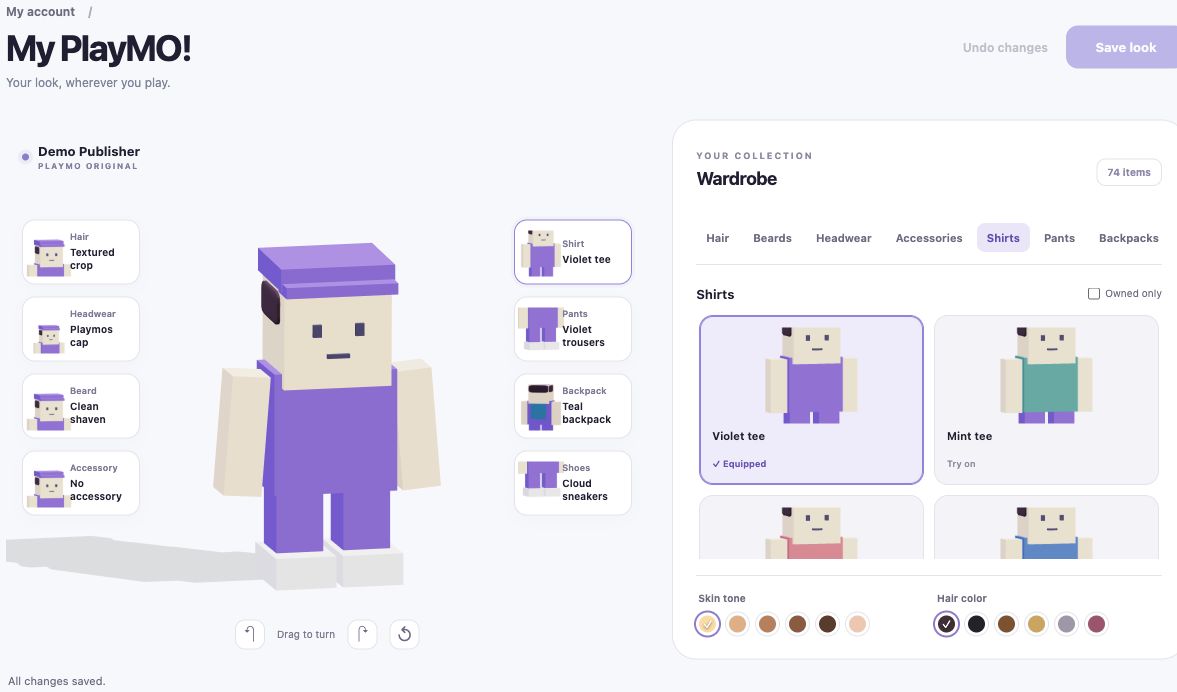
Hair, beards, hats, face accessories, shirts, pants, backpacks and shoes are separate equipment slots. Skin tone and hair color complete the look. Games render that appearance using the shared Mo rig and animation modules, keeping the recognizable Playmos block style. They do not add another dressing screen.
What travels with a Mo#
| Profile data | Meaning |
|---|---|
| Identity and revision | Account-bound avatar identity and version of the saved profile. |
| Equipped appearance | Validated catalog item IDs for eight slots, plus skin tone and hair color. |
| Collectibles | The account-owned collection of item IDs; owning an item is separate from equipping it. |
| Portable attributes | Namespaced string, number or boolean values carried in the profile. A game must explicitly define supported semantics; these are not automatic cross-game powers. |
The current games consume appearance. The profile also carries collectibles and attributes, but cross-game earning, trading and attribute-driven gameplay are not established by the renderer. Account servers own inventory, grants and attribute changes.
How a game uses it#
Use the SDK’s createPlaymo read-only client, then feed the validated profile to the shared renderer. In an embedded Hub game, the trusted host supplies the signed-in viewer’s profile through a source- and origin-bound bridge. There is no linking button inside the game. Retire cached appearance on disconnect, identity change or teardown; never reuse the author’s identity for another viewer.
Keep avatar presentation separate from collision, movement and scoring. A large hat does not extend collision, and equipment or portable attributes cannot grant paid admission, a leaderboard result or a collectible. Handle unavailable profiles gracefully with the base guest look.
Outside the Playmos Hub#
The rig and default look render on an independent website. The SDK accepts a custom read transport through createPlaymo({transport:{get}}), but this extension point does not implement external login or authorize profile access. Your authenticated backend must obtain only the current player’s validated, authorized profile. Do not embed studio secrets or ship someone else’s profile in an export.
For now, the supplied standalone starter uses the guest look; the supplied account adapter targets Hub embedding. Unity avatar support remains a future engine adapter. See Playmos Games for the current runtime and authoring workflow.
If it did not work#
An external website needs its own authorized account transport. Use the guest look until that connection exists.
Try one variation Open the same build as a guest. It should render a base look without exposing the previous player’s profile.
Continue with the next guide →